
Download ATB Mobile APK – Mobile Banking, Secure Transactions, ATBNET Integration
Overview
ATB Mobile is a mobile banking application developed by Arab Tunisian Bank, designed to provide users with secure and convenient access to their financial accounts from smartphones. The app enables remote banking operations, allowing users to manage their finances without visiting a physical branch. Key functions include viewing bank account balances, checking card details, reviewing transaction history, and transferring funds between ATB accounts—both within Tunisia and internationally.
Users can also simulate funding scenarios, access real-time exchange rate conversions, and receive timely bank information alerts. The application integrates with ATBNET, the bank’s existing e-banking platform, using the same secure connection parameters, ensuring consistency in authentication and data protection. This integration supports continuous access to banking services 24/7, regardless of location.
The app is intended for individual customers of Arab Tunisian Bank who seek a digital-first banking experience. It is particularly useful for users who frequently manage their finances on the go, need quick access to transaction data, or require immediate support through in-app contact with a counselor. The app is available for both Android and iOS devices and is free to download and use.
Key Features & Capabilities
- Account and Card Management – View real-time balances, card details, and account status directly from your mobile device.
- Transaction History Review – Access a comprehensive record of past transactions, including dates, amounts, and descriptions.
- Domestic and International Transfers – Initiate fund transfers between ATB accounts within Tunisia and abroad, with support for cross-border transactions.
- Exchange Rate Conversion – View current exchange rates and convert currencies for personal or business use.
- Funding Simulation Tool – Test financial scenarios by simulating deposits or transfers to assess potential outcomes.
- Bank Alerts and Notifications – Receive instant updates about account activity, service changes, or promotional offers.
- Branch Locator and Counselor Access – Search for the nearest branch and connect directly with a bank counselor via the app.
- 24/7 Remote Access – Maintain uninterrupted access to banking services anytime, anywhere, without branch visits.
These features support a wide range of real-world banking needs, from daily balance checks to complex financial planning. For example, a user traveling abroad can use the app to transfer funds to a local ATB account while checking exchange rates. Another user can simulate a deposit to plan their budget. The integration with ATBNET ensures that all actions are synchronized with the bank’s core systems, minimizing delays and discrepancies. The app’s design emphasizes security and usability, making it suitable for both tech-savvy individuals and those new to digital banking.
User Interface, Workflow & Performance
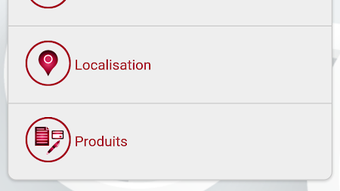
The user interface of ATB Mobile is structured to prioritize clarity and ease of navigation. Core functions are accessible through a clean, intuitive dashboard that organizes services into logical categories. Navigation is streamlined, allowing users to move between sections—such as accounts, transactions, transfers, and support—with minimal steps.
The workflow for common tasks like fund transfers is designed to be efficient, with clear prompts and confirmation screens to prevent errors. The developer did not specify resource usage details, so general performance behavior is based on typical mobile banking app patterns. The app is expected to operate smoothly on devices meeting standard Android and iOS requirements.
Stability is likely maintained through integration with ATBNET, which has a proven track record in secure online banking. The app does not require high CPU or RAM usage for routine operations. However, performance during high-traffic periods or when handling large transaction volumes may vary depending on network conditions and server load.
The developer did not provide additional system requirements or performance benchmarks.
Compatibility & System Requirements
ATB Mobile is compatible with Android and iOS operating systems. The application is available for download on both major mobile platforms. The app’s installation size and specific hardware requirements were not listed by the developer.
Exact system requirements were not provided, so users should ensure their devices meet the minimum standards expected for modern mobile banking applications. Compatibility information is limited to the supported platforms. The app is designed to work with devices that support secure internet connections and modern mobile operating systems.
Users should verify that their device’s OS version is up to date to ensure proper functionality. The developer did not specify whether older versions of Android or iOS are supported. For optimal performance, it is recommended to use a device with a stable internet connection and updated security protocols.
Pros and Cons
Pros
- Free to download and use, with no hidden fees
- Seamless integration with ATBNET for consistent security and data synchronization
- Supports both domestic and international fund transfers
- Provides real-time access to account balances and transaction history
- Includes useful tools like exchange rate conversion and funding simulation
- Offers 24/7 access from any location with internet connectivity
- Enables direct contact with bank counselors for immediate support
- Available on both Android and iOS platforms
Cons
- Compatibility with older Android and iOS versions is not confirmed
- Exact system requirements and resource usage were not disclosed
- App functionality is restricted to Arab Tunisian Bank customers only
- Requires activation via ATBNET, adding an extra step for new users
- Limited to internal banking services; no third-party integrations
FAQ Section
Is ATB Mobile available for both Android and iOS?
Yes, ATB Mobile is available for both Android and iOS devices. Users can download the app from their respective app stores.
Is the app free to download and use?
Yes, ATB Mobile is free to download and use. There are no subscription fees or transaction charges for using the app’s core banking services.
Do I need to activate my device before using ATB Mobile?
Yes, users must activate their device through ATBNET, the bank’s e-banking platform, before they can access ATB Mobile services.
Can I perform international transfers using the app?
Yes, ATB Mobile supports transfers between ATB accounts both within Tunisia and abroad, allowing users to send funds internationally.
Is my data secure when using ATB Mobile?
Yes, the app uses the same secure connection parameters as ATBNET, the bank’s established e-banking solution, ensuring confidential and protected access to your financial information.
Final Thoughts + CTA
ATB Mobile delivers a reliable, secure, and feature-rich mobile banking experience tailored for customers of Arab Tunisian Bank. Its integration with ATBNET ensures a consistent and trustworthy platform for managing finances remotely. The app’s comprehensive suite of tools—ranging from transaction history and transfers to exchange rate conversion and counselor access—makes it a valuable utility for users who value convenience and control.
While specific system requirements and performance data were not provided, the app’s design and functionality align with industry standards for mobile banking applications. It is particularly well-suited for individuals who frequently manage their accounts on the go, travel internationally, or prefer digital banking over branch visits. For those seeking a secure, free, and fully functional mobile banking solution, ATB Mobile stands out as a strong choice.
Download ATB Mobile now.





.png)

